Interviews · A Scribe guide
How to Transcribe an Interview with Speaker Labels
Create an interview transcript with speaker labels, check quotations against the audio and organise themes without losing the original context.
Record or upload the interview, transcribe it with speaker detection, and check each speaker’s identity against the audio before renaming the labels. In Scribe, you can review the transcript, correct wording and create Interview themes with supporting passages. Keep an original recording and a checked transcript for quotation work. A generated theme is a summary, not a verbatim quotation or a substitute for research analysis.
In this guide
Decide what kind of transcript you need
Start with the purpose. A journalist checking a quotation, a researcher preparing qualitative analysis and a team reviewing customer interviews may need different levels of detail. Establish what must be preserved before cleaning the wording.
| Purpose | What to preserve |
|---|---|
| Quotations for publication | The speaker’s actual words and enough surrounding context to check their meaning. |
| Research analysis | The level of detail and handling process approved for the study. |
| Customer interview recap | The participant’s claims, supporting examples and the interviewer’s questions. |
| Internal briefing | Checked themes, relevant passages and unresolved questions. |
If the interview belongs to a research project, follow its approved recording, storage and transcription process. Confirm that using a cloud transcription service is permitted before uploading. Do not assume that a product’s convenience establishes institutional approval.
Get an interview recording that separates voices clearly
Use a quiet location and place the microphone where both interviewer and participant are audible. Ask one question at a time and leave space for an answer. Overlapping speech makes both transcription and speaker separation harder to review.
For an in-person interview, you can use Scribe’s Android app or microphone recording in the web app. For an authorised existing file, upload it directly. For a browser interview, follow the platform guide for Zoom, Google Meet or Teams.
Before starting, inform the participant about recording and your intended use of the transcript. Make a brief test and listen back. A moving meter confirms input, but playback helps you hear whether either voice is too quiet or distorted.
Upload and label the interview in Scribe
- Open Scribe and choose Upload, or finish reviewing a new recording.
- Use a title or participant code that fits your project’s handling requirements. Do not put unnecessary personal information into filenames.
- Select the spoken language and check the recording duration and available minutes.
- Choose Upload & transcribe.
- Open the completed transcript and listen to the opening turns.
- Rename speaker labels where you can establish who is speaking. Check later changes as well as the first exchange.
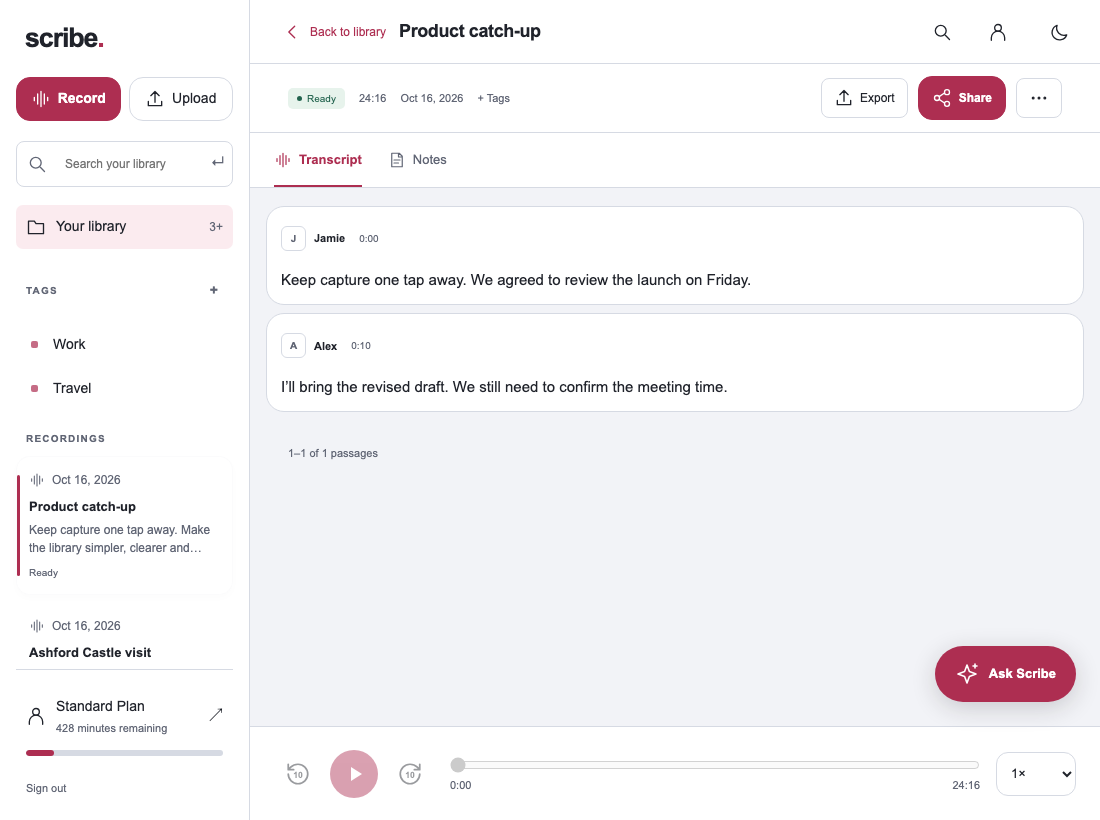
Speaker detection labels voices; it does not prove real-world identities. A participant speaking quietly, interrupting or changing position can require manual correction. If identity is unclear, retain a neutral label and mark the passage for review.
Check quotations before extracting themes
Review names, numbers and any passage you expect to quote. Listen to the preceding question as well as the answer. A short answer can mean something very different when removed from the question that prompted it.
Keep the transcript’s actual wording separate from edited explanatory notes. Do not present a polished summary sentence as a direct quote. If the audio is unclear, return to it or seek clarification rather than silently rewriting the answer into something more convenient.
Create interview themes with links back to the evidence
After checking the transcript, generate Interview themes in Scribe. Review the supporting passages for each point and decide whether the theme accurately describes what this participant said. Add your own interpretation separately when you are doing analysis.
A single recording can help you identify possible themes, but it does not establish how common they are across a population. If you are comparing several interviews, use consistent labels and retain participant context. Searchable text helps you find relevant passages; it does not make different speakers’ accounts interchangeable.
Export a transcript or notes through the web app’s export controls when you need them in a document. Keep the original audio and a checked transcript according to the project’s retention process. Use the audio-to-text guide for file and export basics.
Plan for long interviews and review time
Free includes 30 transcription minutes each month. A ninety-minute interview needs a larger allowance. Standard currently includes 500 minutes and Pro includes 3,000 monthly minutes; check the current plans and account balance before a session.
The web upload screen shows a maximum of 500 MB and three hours per file. For longer authorised recordings, preserve the original and export sensible sections with clear titles. Note where each section starts so you can return to the right part of the original when checking quotations.
Leave time for human review. Automated transcription can remove much of the typing, but accents, specialist vocabulary, background noise and overlapping speech still need attention. Test a representative short recording before committing a whole project to a workflow.
Interview transcription questions
Does speaker detection know the participant’s name?
Treat labels as a starting point. Rename people only when you can verify their identity from the recording or project context.
Can I use generated themes as my final research coding?
Use them as material to review within your chosen method. You remain responsible for interpretation, context and the project’s research requirements.
Should I choose cleaned text or a verbatim record?
Use the version your task requires. Keep the original audio and distinguish editorial notes from the words you intend to quote or analyse.
Sources & further reading
Product instructions and links checked 17 October 2026. Community discussions informed the questions covered here; they are not product benchmarks or testimonials.